Machine-to-Machine (M2M) API Reference
Route360 provides a Machine-to-Machine API allowing external systems, order management platforms, and ERPs to programmatically generate delivery/pickup routes, receive real-time execution callbacks, and monitor route lifecycle events.
Base API URL:
https://api.route360.ai/api
Prerequisites
- An active Route360 client account.
- At least one configured Driver.
- At least one configured Homebase / Depot (used as start/end locations).
Step-by-Step Integration
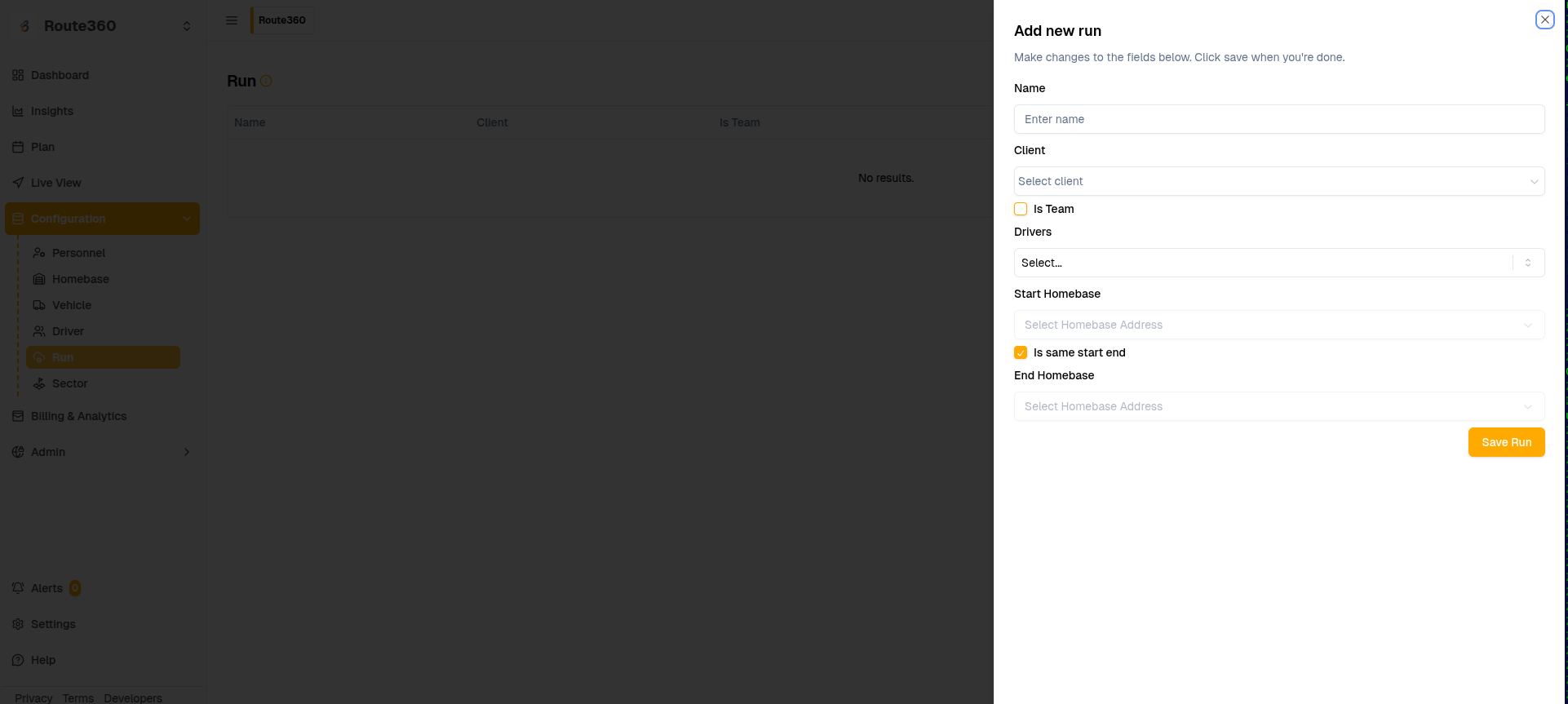
Step 1: Create a Run Configuration on the Dashboard
Before triggering route generation, configure the run parameters (such as assigned vehicles, start/end homebase, and team settings) from the web dashboard:
👉 Navigate to: Configurations/Run
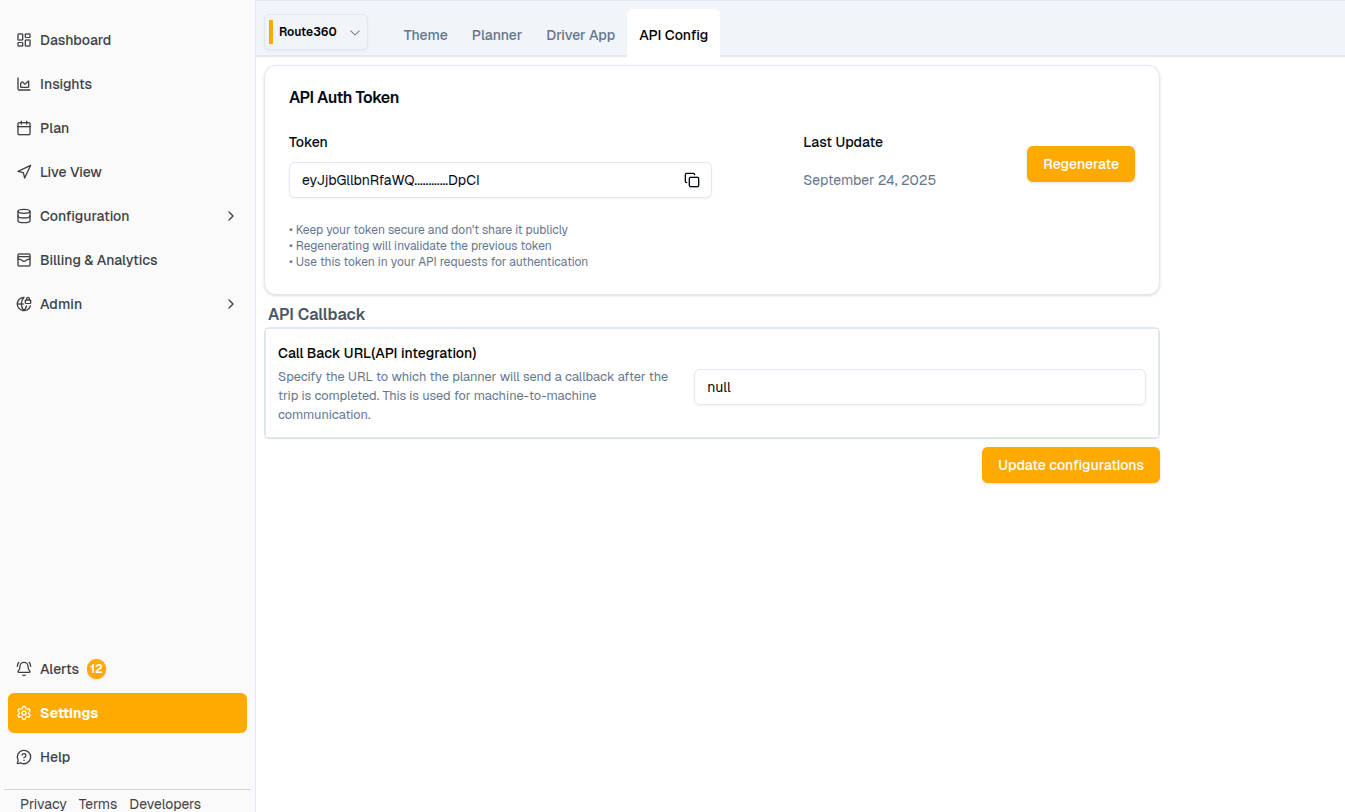
Step 2: Generate Auth Token & Configure Callback URL
Callbacks are sent asynchronously to notify your system when routes are generated or when stops are completed/canceled by drivers.
- Navigate to:
Settings / API Config - Copy your API Auth Token (passed as
X-Tokenin requests). - Set your Callback URL (e.g.
https://your-domain.com/api/v1/route360/events).
💡 Important: The system sends all event payloads via HTTP POST directly to your configured Callback URL without appending
/{planId}to the path. Your webhook handler should readplanIddirectly from the JSON request body.
Step 3: Fetch Available Runs
To inspect existing run configurations and driver assignments, query the Run List API:
Endpoint: GET https://api.route360.ai/api/v1/run/run-list
Header: X-Token: <YOUR_AUTH_TOKEN>
Example Response:
{
  "status_code": 200,
  "data": [
    {
      "id": "01K5X2SHREPFQN3TMGRMAMPXPR",
      "name": "Morning Express Run",
      "is_team": true,
      "drivers": [
        {
          "id": "01JP9YZGK37W0Z98PQW7DKGF27",
          "full_name": "Kirana Driver"
        },
        {
          "id": "01JXF2GAGYTG2DT2B6WT0WCZS5",
          "full_name": "Prithivi Jung"
        }
      ],
      "is_same_start_end": true,
      "start_homebase": "01JP9JQD0YAG2YGY13M08DTN65",
      "end_homebase": null
    }
  ],
  "message": "Success"
}
Step 4: Request Route Generation
Generate optimized routes by submitting order and time window parameters to the route generation endpoint.
Endpoint: POST https://api.route360.ai/api/v1/run/generate
Headers:
Content-Type: application/json
X-Token: <YOUR_AUTH_TOKEN>
Request Body Structure:
{
  "runName": "Morning Express Run",
  "runType": "Delivery",
  "runStartTime": "2026-10-28T08:00:00Z",
  "runEndTime": "2026-10-28T16:00:00Z",
  "preparationTime": 15,
  "runBookings": [
    {
      "orderId": "ORD-1001",
      "priority": 1,
      "quantity": 1,
      "weight": 25,
      "length": 40,
      "width": 30,
      "height": 20,
      "customerName": "Acme Corp (John Doe)",
      "contactNumber": "+977-9800000001",
      "address": "Chabahil, Kathmandu",
      "latitude": 27.7172,
      "longitude": 85.3582,
      "transactionTime": 5,
      "instructions": "Leave at front desk",
      "items": [
        {
          "name": "Electronics Package",
          "quantity": 1
        }
      ]
    },
    {
      "orderId": "ORD-1002",
      "priority": 2,
      "quantity": 2,
      "weight": 10,
      "length": 20,
      "width": 20,
      "height": 15,
      "customerName": "Jane Smith",
      "contactNumber": "+977-9800000002",
      "address": "Baneshwor, Kathmandu",
      "latitude": 27.6915,
      "longitude": 85.3420,
      "transactionTime": 3,
      "items": []
    }
  ]
}
Request Field Specifications:
| Field | Type | Required | Description |
|---|---|---|---|
runName |
String | Yes | Identifier matching a run name or descriptive batch name. |
runType |
String | No | "Delivery" (default) or "Pickup". |
runStartTime |
ISO 8601 String | Yes | Shift start time (e.g. 2026-10-28T08:00:00Z). |
runEndTime |
ISO 8601 String | Yes | Shift end time (must be greater than runStartTime). |
preparationTime |
Integer | Yes | Loading / staging prep time in minutes before departure. |
runBookings |
Array | Yes | List of order stops (minimum 2 bookings required). |
Booking Object Fields:
| Field | Type | Required | Description |
|---|---|---|---|
orderId |
String | Yes | External booking / order reference identifier. |
customerName |
String | Yes | Customer recipient or contact person. |
contactNumber |
String | Yes | Phone number for notification / delivery agent. |
address |
String | Yes | Street delivery address. |
latitude / longitude |
Float | Optional | Coordinates. If omitted, geocoding will be attempted automatically. |
priority |
Integer | Yes | Priority tier (determines delivery time window duration). |
quantity |
Integer | Yes | Package or item count. |
weight |
Integer | Yes | Total parcel weight in kg / grams per configuration. |
length, width, height |
Integer | Yes | Parcel dimensions (for volumetric loading). |
transactionTime |
Integer | No | Estimated service stop duration in minutes (default 3). |
instructions |
String | No | Driver delivery notes or special gate codes. |
items |
Array | No | Optional item list [{"name": "...", "quantity": 1}]. |
Step 5: Handling the Immediate Generation Response
When the request is accepted, Route360 returns an immediate acknowledgment response:
Success Response (HTTP 200 OK):
{
  "status_code": 200,
  "data": {
    "callBackUrl": "https://your-domain.com/api/v1/route360/events",
    "solutionUrl": "run/generate/01JTJ0SC6F5S2NTY66D02W2ZAN",
    "planId": "01JTJ0SC6F5S2NTY66D02W2ZAN",
    "businessNumber": "BIZ-98213",
    "runStartTime": "2026-10-28T08:00:00Z",
    "runEndTime": "2026-10-28T16:00:00Z",
    "preparationTime": 15
  },
  "message": "Plan created successfully. Further processing..."
}planId: The unique identifier for this routing plan.callBackUrl: The registered webhook endpoint where subsequent event updates will be sent.solutionUrl: Relative URL to poll for the completed solution if not relying exclusively on webhooks.
Step 6: Handling Webhook Event Callbacks
All webhook notifications are dispatched as HTTP POST requests to your configured callBackUrl.
⚠️ Key Update: Webhook calls are posted directly to your base
callBackUrlwithout any URL suffix. Parse theplanIdfrom the JSON body to route the event to the correct order plan.
Webhooks deliver two primary types of notifications:
SolutionEvents: Sent when route optimization completes and routes are assigned.DispatchEvents: Sent when drivers execute tasks on the mobile application (e.g. pickup or delivery completed/failed).
1. Type: Solution
A. Routes Assigned Event
Dispatched as soon as orders have been assigned to routes by the solver:
{
  "type": "Solution",
  "planId": "01JTJ0SC6F5S2NTY66D02W2ZAN",
  "status": "DeliveryAssigned",
  "assigned": ["ORD-1001", "ORD-1002"],
  "unassigned": [],
  "message": "2 routes generated"
}
Note: For pickup plans, status will be "PickupAssigned".
B. Full Solution Details
Contains comprehensive route plans, stop sequences, and timing:
{
  "status_code": 200,
  "data": {
    "type": "Solution",
    "planId": "01JTJ0SC6F5S2NTY66D02W2ZAN",
    "status": "Success",
    "message": "2 routes generated",
    "businessNumber": "BIZ-98213",
    "runName": "Morning Express Run",
    "runStartTime": "2026-10-28T08:00:00Z",
    "runEndTime": "2026-10-28T16:00:00Z",
    "totalDistance": 42.8,
    "totalTime": 14200,
    "totalIdleTime": 120,
    "totalLoadTime": 900,
    "runRoutes": [
      {
        "routeId": "01JTJ0S...R1",
        "routeName": "Route 1 - Kirana Driver",
        "routeStartTime": "2026-10-28T08:15:00Z",
        "routeEndTime": "2026-10-28T12:30:00Z",
        "startLocation": {
          "address": "Central Depot",
          "lat": 27.712,
          "lng": 85.32
        },
        "endLocation": {
          "address": "Central Depot",
          "lat": 27.712,
          "lng": 85.32
        }
      }
    ],
    "unassigned": []
  },
  "message": "Success"
}
2. Type: Dispatch
Dispatched in real-time as delivery drivers swipe or record tasks in the Route360 driver app.
Status Codes for Dispatch:
PickupCompleted- Order pickup was successfully executed.PickupCanceled- Order pickup failed or was cancelled.DeliveryCompleted- Order was successfully delivered to recipient.DeliveryCanceled- Delivery attempt failed or was rejected.
Example Dispatch Callback Payload:
{
  "status_code": 200,
  "data": {
    "type": "Dispatch",
    "planId": "01JTJ0SC6F5S2NTY66D02W2ZAN",
    "status": "DeliveryCompleted",
    "routeId": "01JTJ0S...R1",
    "routeName": "Route 1 - Kirana Driver",
    "bookingId": "01JTK9...",
    "orderId": "ORD-1001",
    "customerName": "Acme Corp (John Doe)",
    "address": "Chabahil, Kathmandu",
    "time": "2026-10-28T10:14:32Z",
    "location": {
      "lat": 27.717205,
      "lng": 85.358210
    },
    "sequence": 1,
    "remarks": "Delivered to reception"
  },
  "message": "DeliveryCompleted"
}
Step 7: Polling Alternative (GET Solution)
If you cannot receive webhook callbacks or need to re-query the solved route directly:
Endpoint: GET https://api.route360.ai/api/v1/run/generate/{planId}
Header: X-Token: <YOUR_AUTH_TOKEN>
This returns the same full solution payload documented above.